
Notice: Function _load_textdomain_just_in_time was called incorrectly. Translation loading for the easy-digital-downloads domain was triggered too early. This is usually an indicator for some code in the plugin or theme running too early. Translations should be loaded at the init action or later. Please see Debugging in WordPress for more information. (This message was added in version 6.7.0.) in /home/sites/lilyturfthemes.com/public/wp-includes/functions.php on line 6260

Deprecated: Creation of dynamic property Easy_Digital_Downloads::$payment_stats is deprecated in /home/sites/lilyturfthemes.com/public/wp-content/plugins/easy-digital-downloads/easy-digital-downloads.php on line 164
Color Settings – LilyTurf Themes

documentation

Color Settings

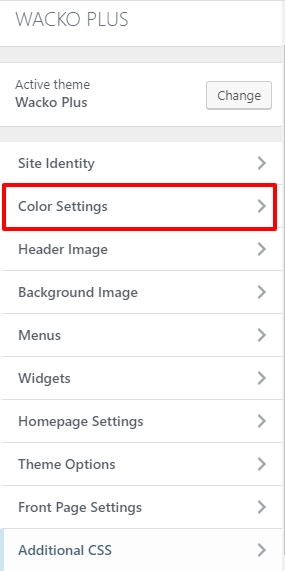
In order to change the color of the site, you can follow the steps below:
  1. Go to Appearance > customize
  2. Select Color Settings
  3. You can updates color as you wish
  Note: For other sections color settings you will find options to change on each of it's respective sections.
Contact our Customer Support that is always ready to help you with any possible questions, problems or information.